Upload an existing file
Bring the recording from your usual capture workflow. DemoRefine analyzes the pixels and actions in the file; it does not require you to record again inside a new browser extension.
You pressed stop, but your product demo still needs an edit. There is a pause before the feature loads, a detour through the wrong tab, and a cursor that takes the scenic route to the button. DemoRefine starts at that moment: upload a supported recording, review suggested fixes, and export a cleaner take.
Keep using Loom to record and share when it fits your team. DemoRefine handles the rough-take cleanup after capture; it does not replace Loom's recorder, hosting, or viewer collaboration. You need a video file you can upload. Loom's Starter plan does not include video downloads, so check access to your original file or your plan before relying on this workflow.
MP4, MOV, WebM or M4V · up to 500 MB / 15 minutes in the current alpha · no payment required
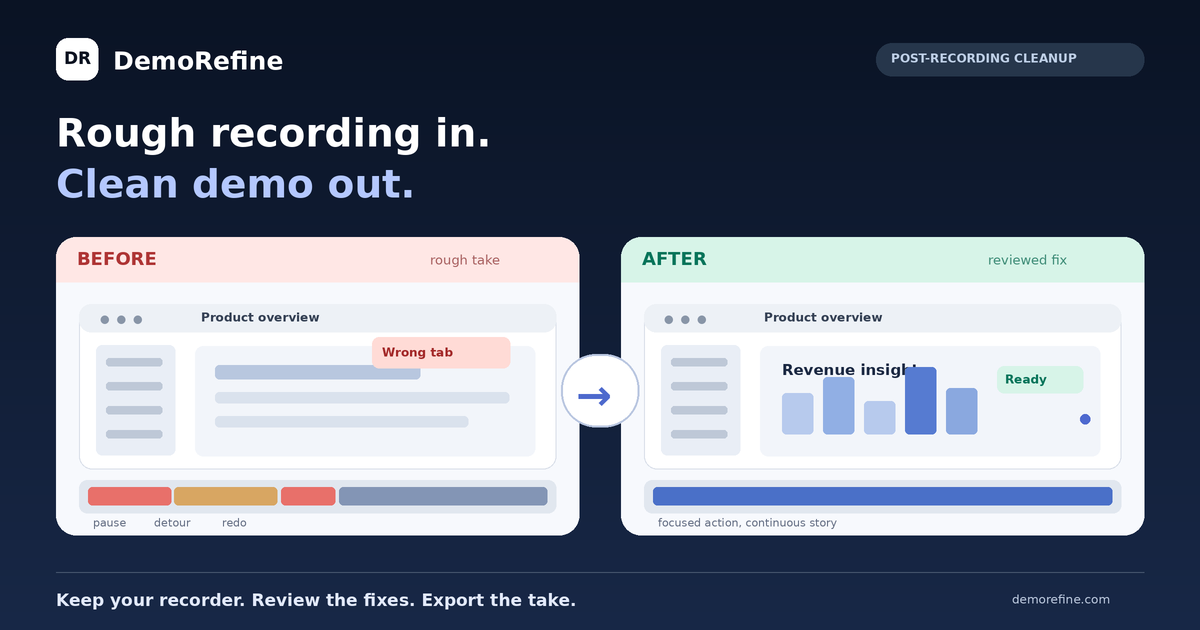
A screen recorder faithfully captures what happened. That includes the thirty seconds spent waiting for a dashboard to load, the moment you opened the wrong tab, and the mouse movement that crossed every part of the page before finding the right control. If you explain a feature aloud, you may also leave a few “ums” and restarts in the audio. The useful demonstration is in there; the audience still has to sit through the setup and false starts.
Imagine a sales rep showing a new reporting view. They start the capture, discover a filter is still set to last month, back out, wait for a chart to repaint, open a settings panel by mistake, and finally show the result. The rep got the right take in one recording, but the shared video makes the feature feel slow and difficult. A product marketer can trim those moments by hand, or record again and hope every click lands. Neither is a good use of the time between a customer request and the reply.
Those three to five rough moments are a common scenario, not a measured average for every Loom recording. The practical question is whether you can keep the correct parts of your take and remove only the interruptions. DemoRefine is designed to make those edits reviewable, so an ambiguous click or a meaningful pause can stay when context matters.
Loom is built for quick recording, hosting and sharing. Its Starter tier includes 25 videos per person and recordings up to five minutes, at up to 720p. Loom's pricing table places trim-and-stitch editing and video downloads in Business, and lists silence and filler-word removal under Business + AI. Those paid plans may be the right choice if the whole team wants Loom's capture and sharing tools together; the current public prices shown are $18 and $24 per user per month respectively.
Other tools solve different parts of the job. Cap offers an open source recorder and local editing, with a self-hosted option for teams that want infrastructure control. Custom S3 and Google Drive storage are optional paid features, not a prerequisite for local recording. Tella combines recording, layouts and a timeline with automated editing features, including silence removal and an AI mistakes finder; its published plans are paid. If those end-to-end workflows already fit your needs, there is no reason to replace them just to make one demo.
DemoRefine takes the narrower route: start with a supported video file you already have, suggest edits after the take, and let you review them before export. It does not promise to import a hosted Loom URL, transcribe speech, remove every filler word, or provide another video hosting system.
Bring the recording from your usual capture workflow. DemoRefine analyzes the pixels and actions in the file; it does not require you to record again inside a new browser extension.
The alpha looks for safe pauses, hesitant navigation, reversible wrong turns and cursor or camera polish. Fix Cards explain each suggestion; you can keep the original action when a change would hide important context.
Preview the cleaned version next to the original. The HD export follows your reviewed decisions and renders at source resolution and frame rate where the source permits.
The quick preview is lower resolution for review; the final export is rendered separately. Processing time and results depend on recording length and content.
Three five-second before/after pairs from earlier alpha benchmark tests: a wrong click, a wrong tab and a canceled modal. These use a synthetic app and show real processed output from those tests, not a Loom recording or a guarantee that every take receives the same fixes.
This comparison focuses on what you can do with a rough take today. “General editor” describes a category, not a particular plan; capabilities and prices vary by product. Loom figures come from its public pricing page. DemoRefine details reflect the current private alpha.
| Comparison point | Loom Starter (free) | General screen recording editor | DemoRefine (private alpha) |
|---|---|---|---|
| Free-tier editing | GIF thumbnails; trim and stitch are listed on paid Business. | Varies; basic trims may be free, advanced edits may be paid. | AI cleanup review and Fix Cards available free during alpha. |
| Post-recording cleanup | Silence and filler-word removal are listed on Business + AI, not Starter. | Usually a manual editing workflow; automation varies. | Suggested pauses, reversible missteps and visual focus; review before export. |
| Need a different recorder? | No, Loom is the recorder. | Depends on whether the editor accepts imported video. | No; upload a supported existing video file. |
| Keep your capture workflow? | Yes for Loom capture and Loom sharing. | Depends on supported import formats and workflow. | Yes for capture; sharing remains in your existing tool. |
| Branding / watermark | Loom branding on video page and embedded player; removal is a paid feature. | Varies by product and plan. | No DemoRefine watermark on the exported file in the current alpha. |
| Output clarity | Recording quality up to 720p on Starter; video download is a paid feature. | Depends on source, export settings and plan. | Quick low-resolution preview; final HD export follows source resolution / frame rate. |
| Getting started | Record, then share the hosted Loom link. | Open a project and make manual cuts or adjustments. | Upload a file, review suggestions, export; no timeline. |
| Current price / limits | $0; up to 25 videos per person and five minutes per screen recording. | Varies by product and plan. | $0 during private alpha; 500 MB and 15 minutes per upload. |
Source: Loom pricing and feature comparison (Starter, Business and Business + AI). At the time of review, Loom lists Business at $18 and Business + AI at $24 per user/month on its pricing page; billing selection and regional terms may affect a checkout total. DemoRefine pricing and alpha limits.
You have repeated the same feature walkthrough because a notification arrived, a page loaded slowly, or you clicked the wrong tab. The last recording contains the right story, plus one awkward detour. Upload the usable take, inspect the proposed change, and decide whether to keep it instead of attempting take nine.
A buyer wants to see a workflow before a call tomorrow. Your recording reaches the correct screen, but the first minute contains a blank page and a mistaken menu. Use DemoRefine to review the dead time and the wrong path. If a fix changes the meaning of the demo, keep the original segment.
Several people can record product updates; only one knows how to use a timeline. That person becomes the bottleneck before each launch. Let the person who recorded the video inspect plain-language Fix Cards and export a first version. The skilled editor can still handle captions, sensitive data or complex narrative changes separately.
DemoRefine is free during its current private alpha for post-recording cleanup. It is a web upload workflow, not a replacement for Loom's screen recorder, hosted links or team comments. You bring a supported video file and review AI-suggested fixes before a full-resolution export. Current per-file limits are 500 MB and 15 minutes; future pricing is not yet final.
Loom Starter's public pricing lists GIF thumbnails, while trim and stitch appear under Business, and silence or filler-word removal under Business + AI. Starter also does not list video downloads. DemoRefine can process a supported file you are entitled to use; it cannot fetch or edit a hosted Loom link by itself. Check your Loom plan and whether you still have the local recording.
The answer depends on which step slows you down. Loom is useful for recording and sharing a quick message. If you need to refine a rough take without learning a timeline, DemoRefine offers reviewable post-production suggestions for an existing video file. If your goal is integrated capture, hosting, analytics or team collaboration, compare those features separately; DemoRefine's alpha does not provide them.
Yes, if you have a usable video file and the right to process it. Loom's pricing page lists video downloads under Business rather than Starter, so a Starter user should not assume a hosted Loom video can be exported. If the original recording is still on your computer, or your plan lets you download it, a supported MP4, MOV, WebM or M4V can be uploaded to DemoRefine.
It suggests safe trims and, when the visual evidence is strong enough, certain reversible wrong-path recoveries. A misclick that causes a meaningful state change is treated cautiously rather than erased blindly. You can compare the original with the preview and choose “Keep original” on individual Fix Cards. The result varies with the source; manual review is still important before sending a customer demo.
Do not rely on the current alpha for transcript-based speech editing or guaranteed filler-word removal. Its focus is visual workflow cleanup, hesitation, safe pauses and cursor or camera polish. Loom Business + AI lists filler-word and silence removal, and some dedicated editors offer spoken-word controls. Check the exported audio yourself before sharing, especially where a pause carries meaning.
No. DemoRefine currently produces a reviewed video file, while Loom handles hosted video pages, viewers and reactions. A private DemoRefine review link is temporary and protected by a per-job token; it is not intended as a permanent public hosting destination. Export the result and put it in the sharing system your team already uses.
The current alpha accepts MP4, MOV, WebM and M4V files up to 500 MB and 15 minutes. A fast, lower-resolution preview helps you check proposed fixes; the separate HD export renders from the source at its original resolution and frame rate where possible. It cannot invent detail missing from a 720p source or guarantee that every codec behaves identically.
The current DemoRefine alpha does not add a DemoRefine watermark to its exported video, and alpha access is free. Its planned paid tiers and future prices have not been finalized, so do not plan a budget around an assumed perpetual free tier. The pricing page records what is available now and distinguishes planned features from active subscriptions.
Upload one recording you are comfortable testing, review the suggested fixes, and export a version you would actually send. Private alpha is free, with a 500 MB / 15-minute file limit.
Try DemoRefine free